
Waterfall - Agile - Scrum - wireframe - mockup - prototype

Waterfall

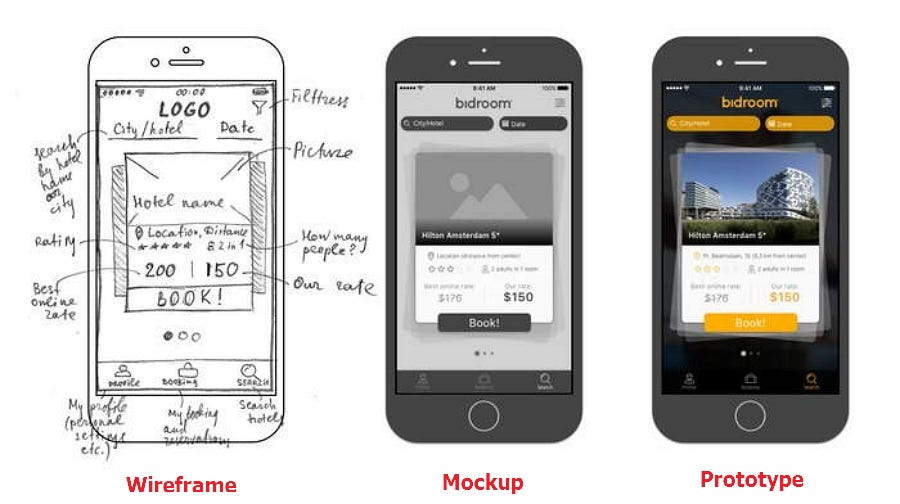
 Wireframes and mockups can help, but there’s no question that most end users have some difficulty putting these elements together with written requirements to arrive at a good picture of what they will be getting.
Agile

As work is completed, it can be reviewed and evaluated by the project team and customer, through daily builds and end-of-sprint demos. Agile relies on a very high level of customer involvement throughout the project, but especially during these reviews.

Scrum

Scrum is an agile process that allows us to focus on delivering the business value in the shortest time. It rapidly and repeatedly inspects actual working software. It emphasizes accountability, teamwork, and iterative progress toward a well-defined goal.
The Scrum Framework usually deals with the fact that the requirements are likely to change or most of the time not known at the start of the project.

Comments

Popular posts from this blog

for loop in javascript - promise - .eslintrc for "for of"

the vast majority of cases  map ,  forEach ,  find  etc. can be used.  async function printFiles () { const files = await getFilePaths(); await Promise.all(files. map (async (file) => { const contents = await fs.readFile(file, 'utf8') console.log(contents) })); } const inventory = [ { name : 'apples' , quantity : 2 } , { name : 'bananas' , quantity : 0 } , { name : 'cherries' , quantity : 5 } ] ; const result = inventory . find ( ( { name } ) => name === 'cherries' ) ;   function getFirstMatching(array) { for (let item of array) { const result = heavyTransform(item); if (result) { return result; } } } Specifically this shuts down the whole no-restricted-syntax. If you want to cherry-pick, here is the current definition: 'no-restricted-syntax' : [ 'error' , { selector : 'ForInStatement' , message...

fs.writeFile - permission issue on GCP (Google Cloud Run)

error on this: fs . writeFile ( fileName , pdfBytes , err => { if ( err ) { console . log ( err . message ) reject ( err . message ) } else resolve ( fileName ) }) #1 It looks like when deployed into Cloud Run it also requires the extra permission "Service Account Token Creator" to run  getSignedUrl . Locally for some reason this role is not required. #2 Only the directory  /tmp  is writable in Cloud Run. So, change the default write location to write into this directory. However, you have to be aware of 2 things: Cloud Run is stateless, that means when a new instance is created, the container start from scratch, with an empty  /tmp  directory /tmp  directory is an in-memory file system. The maximum allowed memory on Cloud Run is 2Gb, your app memory footprint included. In addition of your file and Airflow, not sure that you will have a lot of space. A final remark. Cloud Run is active only when it...

add new site to Vagrant Homestead

Homestead.yaml: folders : - map : ~/ freshinup to : / home / vagrant / code sites : - map : smartmotors . local . com to : / home / vagrant / code / smartmotors / public php : "7.3" - map : arbor . test to : / home / vagrant / code / arbor / public php : "7.3" /etc/hosts: 192.168.10.10 arbor.test 192.168.10.10 smartmotors.local.com vagrant up --provision php artisan smartmotors:seed --quickstart